The best way one-two-punch to prepare for the CompTIA A+ exam is to study and answer practice questions.
In this article we’ll discuss what will be on the exam and provide advice on how best to ace the exam, but most importantly we’ll provide you with both multiple choice and performance-based questions (PBQs) you can use to test your knowledge of each domain you will be tested on.
The following won’t be an exhaustive list of questions that cover every area you’ll be tested on. However, they will give you a glimpse of what CompTIA A+ will look and feel like.
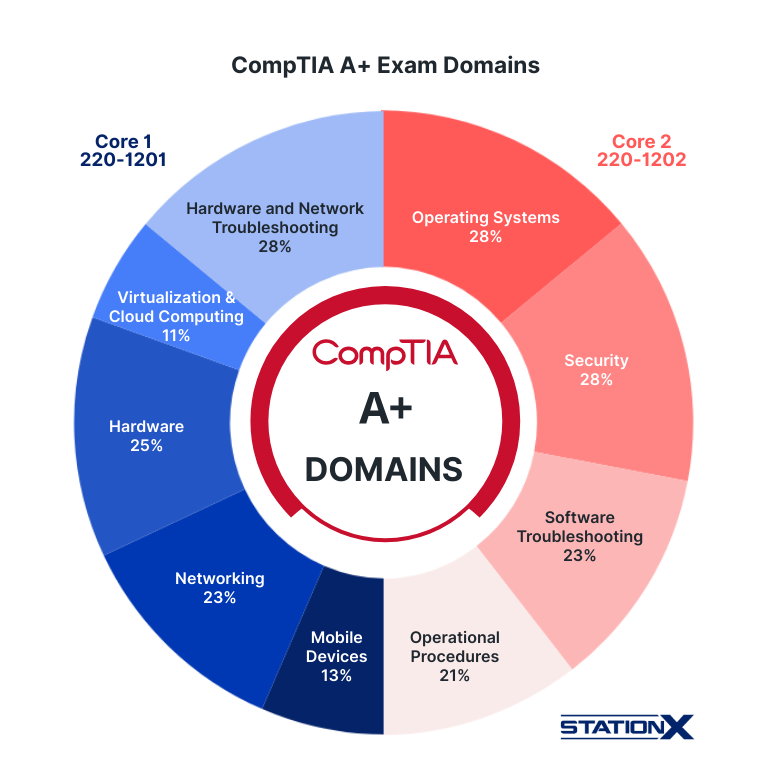
CompTIA A+ Exam Domains
Unlike nearly every other CompTIA exam, CompTIA A+ comprises of two exams: Core 1 and Core 2.
In order to obtain the A+ certification, you must pass both of these exams.
- Core 1 covers the technical foundations of IT support and infrastructure, such as hardware, networking concepts, and troubleshooting skills.
- Core 2 expands into operational and security-focused areas, including software, system administration, and cybersecurity best practices.
Each exam is comprised of no more than 90 questions to be answered in 90 minutes.
The CompTIA A+ exams include two main question formats:
- Multiple-choice questions: They evaluate your ability to remember key information, apply concepts, and select the most accurate answer from several options. Some questions have a single correct answer, while others require you to choose multiple correct options. These questions measure your theoretical understanding of hardware, software, networking, and troubleshooting topics.
- Performance-based questions (PBQs): These are interactive, scenario-based tasks that assess how well you can apply your knowledge in practical situations. You may need to configure a device, troubleshoot a simulated issue, or organize steps in the correct sequence to solve a problem. PBQs usually appear at the beginning of the exam and focus on real-world problem-solving skills rather than simple memorization.
The exact number of questions will depend on how many PBQ questions you must answer. The passing score for Core 1 is 675/900. The passing score jumps to 700/900 for Core 2.
Core 1 Sample Questions
To prepare you for the CompTIA A+ exam, here are two CompTIA A+ practice questions for each domain you’ll be tested on in addition to two Performance Based Questions.
Mobile Devices (13%)
Test takers must understand the fundamentals of mobile devices, including how hardware is installed, how devices connect to networks, and how to troubleshoot common issues.
Things you must remember:
Sample Question 1:
What must be initially configured on a mobile device to allow for synchronization of mail, contacts, and calendar data?
a) Installation of a Mobile Device Manager (MDM) application.
b) Enabling encrypted data transfer protocols.
c) Enabling full-disk encryption.
d) Account setup with a service provider such as Microsoft 365, Google Workspace, or iCloud.
Click for answer
d) Account setup with a service provider such as Microsoft 365, Google Workspace, or iCloud.
Sample Question 2:
Which technology allows a mobile device to determine its geographic location using signals from satellites?
a) Bluetooth
b) RFID
c) GPS
d) NFC
Click for answer
c) GPS
Sample Performance Based Question:
Networking (23%)
Networking focuses on how different devices and systems communicate and share resources, whether it’s a few devices on a small home network or large numbers of systems connected across global networks.
Things you must remember:
Sample Question 1:
What protocol does the largest network in the world use?
a) AppleTalk
b) TCP/IP
c) HTTP
d) IPX/SPX
Click for answer
b) TCP/IP
Sample Question 2:
MAC addresses can be represented by how many hexadecimal characters?
a) 4
b) 8
c) 12
d) 16
Click for answer
c) 12
Sample Performance Based Question:
Hardware (25%)
Hardware covers the physical components of computer systems and how they are installed, configured, and maintained in real-world environments.
Things you must remember:
Sample Question 1:
Sam’s inkjet printer's output has the bottom of every letter missing in text and strange horizontal lines evenly spaced in her images. What part of the inkjet should she check for problems?
a) The printhead
b) The paper take-up rollers
c) The photosensitive drum
d) The printer's resolution
Click for answer
a) The printhead
Sample Question 2:
Which component of a computer is responsible for processing and rendering graphics, particularly in gaming and graphic design?
a) CPU
b) RAM
c) GPU
d) PSU
Click for answer
c) GPU
Sample Performance Based Question:
Virtualization & Cloud Computing (11%)
Virtualization and cloud computing cover how resources are delivered through virtual environments and cloud services. You’ll be tested on virtual machines, hypervisors, desktop virtualization, cloud service models (IaaS, SaaS, PaaS), and common use cases.
Things you must remember:
Sample Question 1:
Which of the following best describes the primary benefit of using Platform as a Service (PaaS) for application development?
a) It provides the cheapest option for hosting applications and services.
b) It includes pre-configured virtual machines for faster deployment.
c) It allows developers to build applications without managing the underlying infrastructure.
d) It offers the highest level of security for applications.
Click for answer
c) It allows developers to build applications without managing the underlying infrastructure.
Sample Question 2:
In a virtualized environment, what is a snapshot?
a) A photograph of a physical server
b) A backup of a virtual machine's current state
c) A virtual version of a physical network switch
d) A real-time video stream of a virtual machine's activities
Click for answer
b) A backup of a virtual machine’s current state
Sample Performance Based Question:
Hardware and Network Troubleshooting (28%)
This domain centers on identifying the root causes of technical problems and restoring proper operation across systems, devices, and network connections. Although it’s an entry-level exam, CompTIA A+ will test your ability to apply logical troubleshooting methods to real-world problems.
Things you must remember:
Sample Question 1:
A user reports that their computer starts up but displays no image on the monitor. What should you check first?
a) Network cables
b) RAM modules
c) Power supply
d) Monitor cable
Click for answer
d) Monitor cables
Sample Question 2:
A computer on the network cannot access the internet, but others can. What could be the issue?
a) Virus infection
b) Faulty power supply
c) Incorrect DNS settings
d) Low RAM capacity
Click for answer
c) Incorrect DNS settings
Sample Performance Based Question:




Core 2 Sample Questions
Both Core 1 and Core 2 must be passed to obtain your CompTIA A+ certification. Here are CompTIA A+ practice questions designed to help you pass the Core 2 exam.
Operating Systems (28%)
Core 2 covers key concepts related to operating systems and how they are installed, configured, and managed across different platforms. You should be familiar with widely used operating systems and the tools used to maintain and troubleshoot them.
Things you must remember:
Sample Question 1:
To take ownership of a Linux file, which command should you use?
a) pwd
b) chmod
c) chown
d) passwd
Click for answer
c) chown
Sample Question 2:
Which of the following tools allows a person with administrator privileges to add local users to a Windows system?
a) The Local Users and Groups Control Panel applet
b) The Local Users and Groups Snap-in under Computer Management
c) The Local Users and Groups tab in the properties for My Computer
d) The Local Users and Groups tab in the properties for My Network Places
Click for answer
b) The Local Users and Groups Snap-in under Computer Management
Sample Performance Based Question:
Security (28%)
Security covers the fundamental concepts needed to protect systems, data, and users from common threats. You’ll be tested on how to apply security best practices and respond to real-world security scenarios.
Things you must remember:
Sample Question 1:
Tony receives a computer that has a Trojan Horse virus. Which of the following should you do first?
a) Identify the malware
b) Establish how the virus was acquired
c) Run the System Recovery utility
d) Rollback to the System Restore Point
Click for answer
a) Identify the malware
Sample Question 2:
You’re a technician working for a large company and you notice a user has left a Post-it note attached to her monitor of a new password that he was just given. What should the technician do?
a) Take it and give it to him when he gets back from lunch
b) Explain to her how dangerous it is to leave passwords lying around
c) Inform their supervisor
d) Log in with it and change her password to teach her a lesson
Click for answer
c) Inform their supervisor
Sample Performance Based Question:
Software Troubleshooting (23%)
Software troubleshooting focuses on diagnosing and resolving common issues related to operating systems, applications, and device security. You’ll be tested on your ability to identify problems and apply practical solutions.
Things you must remember:
Sample Question 1:
Your computer's web browser is displaying unwanted pop-up ads and toolbars. What could be causing this issue?
a) Insufficient power supply capacity
b) Malware or adware
c) Overheating CPU
d) Outdated graphics driver
Click for answer
b) Malware or adware
Sample Question 2:
A user reports that their computer takes a long time to boot up. What is a potential solution to improve boot time?
a) Install a larger monitor
b) Upgrade the keyboard
c) Disable unnecessary startup programs
d) Add more RAM
Click for answer
c) Disable unnecessary startup programs
Sample Performance Based Question:
Click for answer
c) Disable unnecessary startup programs
Operational Procedures (21%)
Obtaining CompTIA A+ shows employers that you understand the basics of operational procedures. This domain covers the standards and best practices that ensure IT environments run efficiently, securely, and with minimal disruption. You’ll be tested on your ability to follow proper documentation, safety protocols, communication practices, and backup and recovery processes.
Things you must remember:
Sample Question 1:
In the context of IT and digital forensics, what does the "chain of custody" refer to?
a) A document that outlines the company's IT policies
b) A secure physical lock used to protect IT equipment
c) The process of documenting and maintaining the integrity of digital evidence
d) The hierarchy of command within an IT department
Click for answer
c) The process of documenting and maintaining the integrity of digital evidence
Sample Question 2:
What type of computer backup involves copying all data, including operating system and application files, to create a complete and exact replica of the system's state at a specific point in time?
a) Incremental backup
b) Full backup
c) Differential backup
d) Cloud backup
Click for answer
b) Full backup
CompTIA A+ Exam Advice
While these questions may be daunting, remember that CompTIA A+ is an entry-level IT certification. Many of the people who take this exam are new to the field and are without professional experience. Through their studies alone, most people are able to pass these two exams and obtain their certification.
Here are some helpful strategies to improve your test scores:
- Memorize the acronyms and their meanings at the bottom of CompTIA’s objectives page (CompTIA will only supply the acronyms on the exams).
- Studying is not a race. There is a lot of material to cover. Take your time so you understand each and every item on the list of objectives.
- Schedule an exam date in the future to give you the motivation you need to study.
- If you desire, you can take the exam in the comfort of your own home.
- Study while simultaneously taking practice tests to gauge your knowledge.
Conclusion
These CompTIA A+ practice questions are designed to give you a taste of what to expect when you two the two A+ exams.
To adequately prepare for the A+ certification, we recommend using our A+ cheatsheet, enrolling in a course that walks you through the topics covered on the exam, and taking practice tests prior to the exam to gauge your mastery of the test material. Use practice tests to gauge which areas you understand and which areas you need to spend more time studying.
Obtaining CompTIA A+ is often the first step towards a long-term career in cyber security. To understand the best way to move forward and obtain the career you want, we recommend joining StationX’s Master's Program, where you’ll have access to certification advice, mentorship, over 30,000 classes and labs, and receive assistance creating a blueprint for obtaining the career you want.
You can also purchase our complete A+ Core 1 and 2 Training Bundle below, and get discounted CompTIA A+ Core 1 and Core 2 exam vouchers.
The Complete CompTIA A+ Training Bundle (Version 15) contains:
- CompTIA A+ Course: CompTIA A+ Core 1 Objectives (220-1201)
- CompTIA A+ Course: CompTIA A+ Core 2 Objectives (220-1202)
- CompTIA A+ Core 1 Practice Test Online (220-1201)
- CompTIA A+ Core 2 Practice Test Online (220-1202)
- CompTIA A+ Study Material: Core 1 Exam Domain Flashcards (v15)
- CompTIA A+ Study Material: Core 2 Exam Domain Flashcards (v15)