If you’re looking to break into the cyber security industry, the CompTIA Security+ is a great certification to get. But before embarking on this journey, you need to know, “how long does it take to study for Security+” to plan your journey to your first entry-level job in cyber.
This article answers this question by providing a comprehensive roadmap that details what to expect in the exam, the factors that may affect your study time, what the average study time is, and how to best prepare for the Security+ exam.
Now, let’s look at how long to study for Security+ and what affects your timeline.
About CompTIA Security+
CompTIA Security+ is an entry-level certification that proves you have the fundamental skills to perform core security roles within an organization. Once you learn these core skills, you can pursue a specialist career path by taking one of CompTIA's other certifications.
To teach these fundamental skills, Security+ covers five cyber domains:
- General Security Concepts (12%): Covers foundational principles of information security, including essential concepts, definitions, and best practices.
- Threats, Vulnerabilities, and Mitigations (22%): Focuses on identifying security threats and vulnerabilities, and implementing effective countermeasures and mitigation strategies.
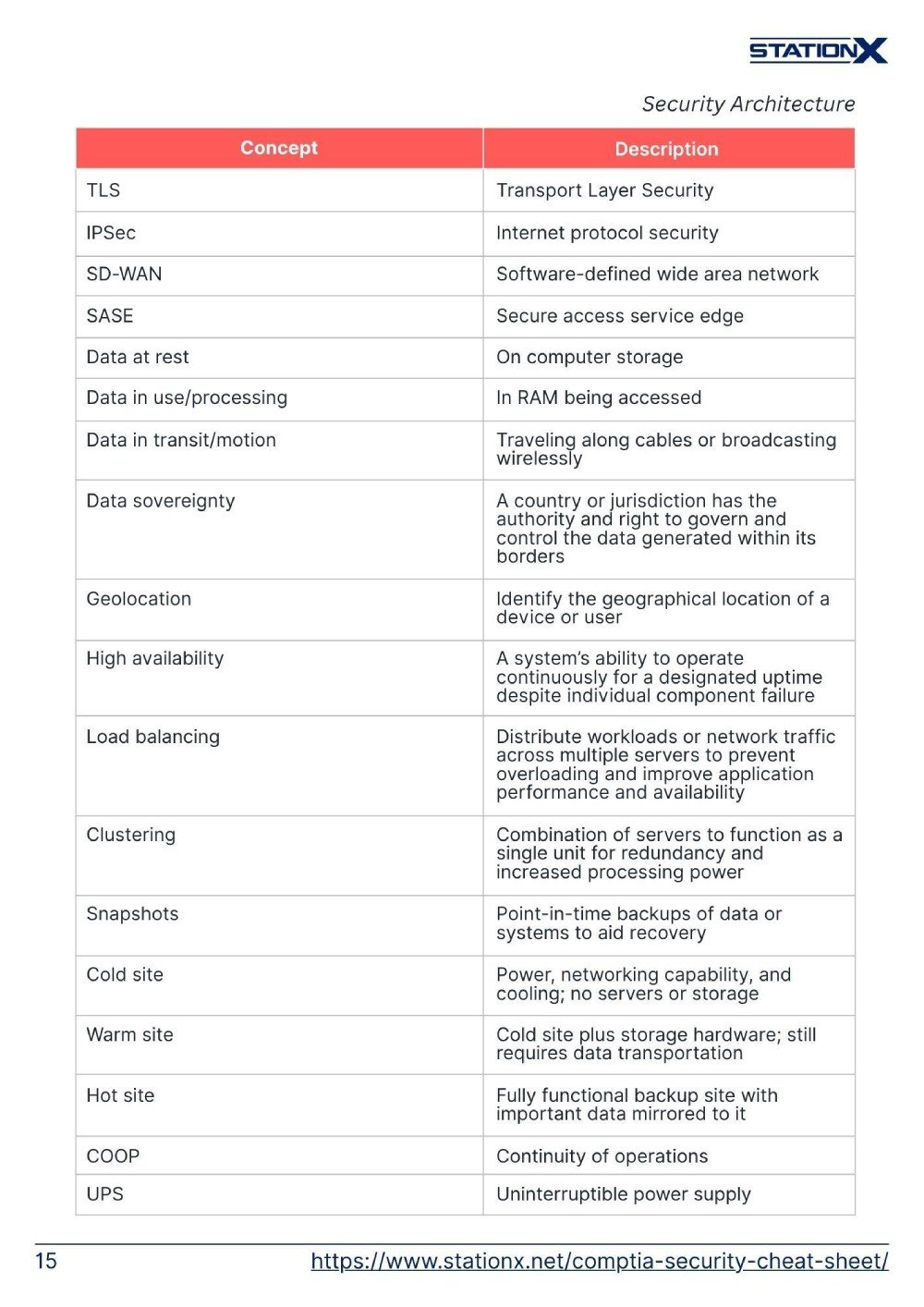
- Security Architecture (18%): Examines the design and structure of secure systems, emphasizing network and application security frameworks.
- Security Operations (28%): Involves day-to-day security management, incident response, and the maintenance of a secure IT environment.
- Security Program Management and Oversight (20%): Deals with managing and overseeing security programs, ensuring compliance, and aligning security initiatives with business goals.

Security+ Exam Details:
- The exam consists of 90 questions. These are multiple-choice or performance-based questions.
- You have 90 minutes to complete the exam.
- The passing score is 750 on a scale of 100–900.
For a comprehensive guide on the Comptia Security+ certification and exam, read What Is CompTIA Security+? An Essential Guide.




Factors Affecting Study Times
How long it takes for you to study for the Security+ certification will depend on multiple factors. The three main ones are your prior technical knowledge, your level of industry or hands-on experience, and whether you have obtained other certifications prior to studying for Security+. Let’s look at each in detail.
Prior Knowledge
If you have knowledge of cyber security, security principles, networking, or general IT before studying for the Security+ certification, you will have a significantly easier journey.
In particular, prior networking experience helps because so much of the exam assumes you understand how networks work. That foundation lets you grasp Security+ basic concepts faster and more efficiently, and you may even recognize parts of the content from what you’ve learned or done before.
Experience
The Security+ exam is split into two types of questions; multiple-choice questions that test your knowledge of the study material and performance-based questions that assess your practical skills in cyber security by grading your lab work. If you have experience in a cyber security or IT role, these performance-based questions will be easier for you to answer, and your study time will be reduced.
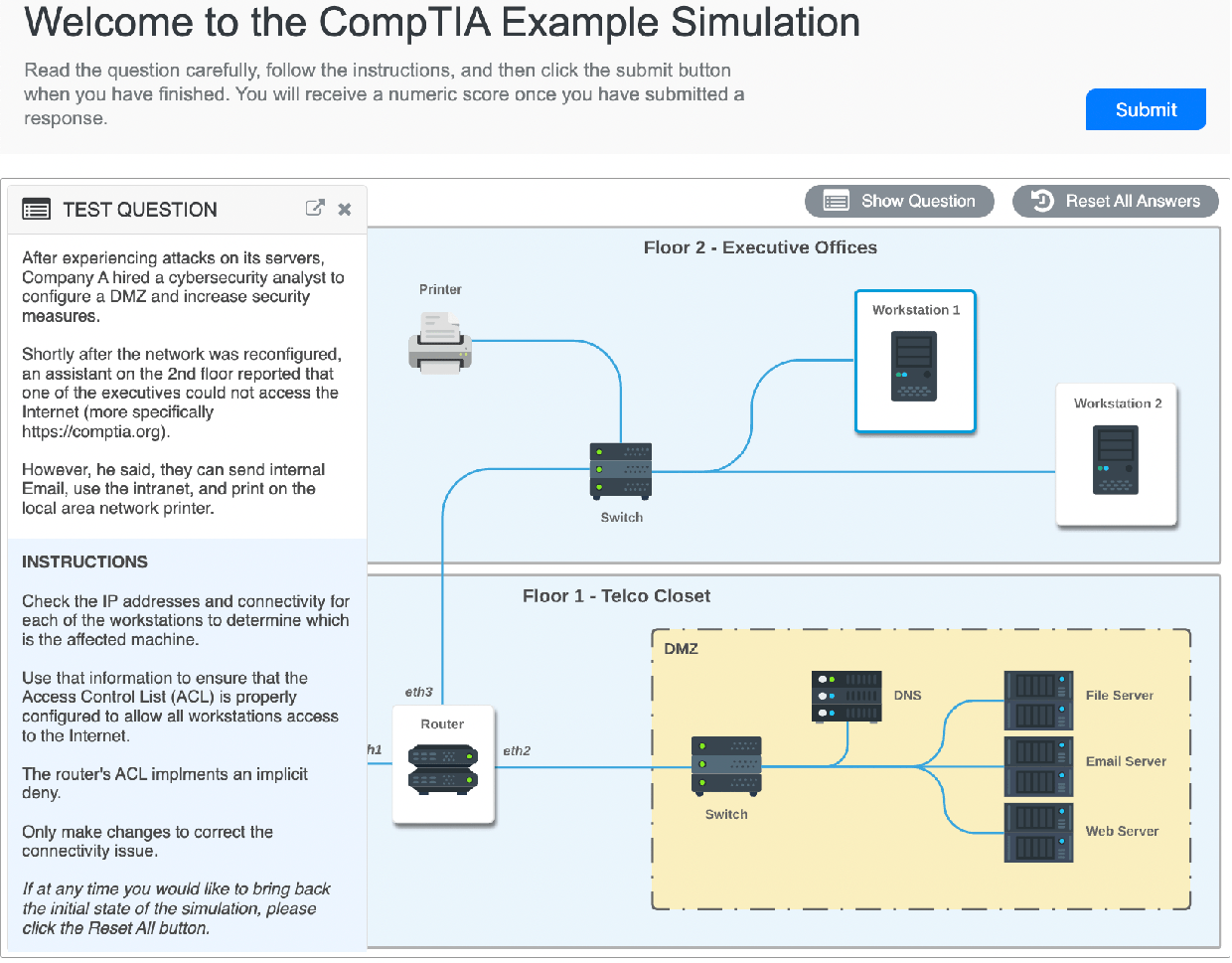
You may have come across many of the scenarios described in the exam before, and you will be able to apply your real-world experience to the question. If not, you may be able to relate a similar experience to the exam question and deduce the correct answer.
Prior experience is invaluable in answering performance-based questions as it develops your critical thinking, problem-solving, and troubleshooting skills. Learn more in Top Cyber Security Skills You Need for an Exciting Career.
Other Certifications
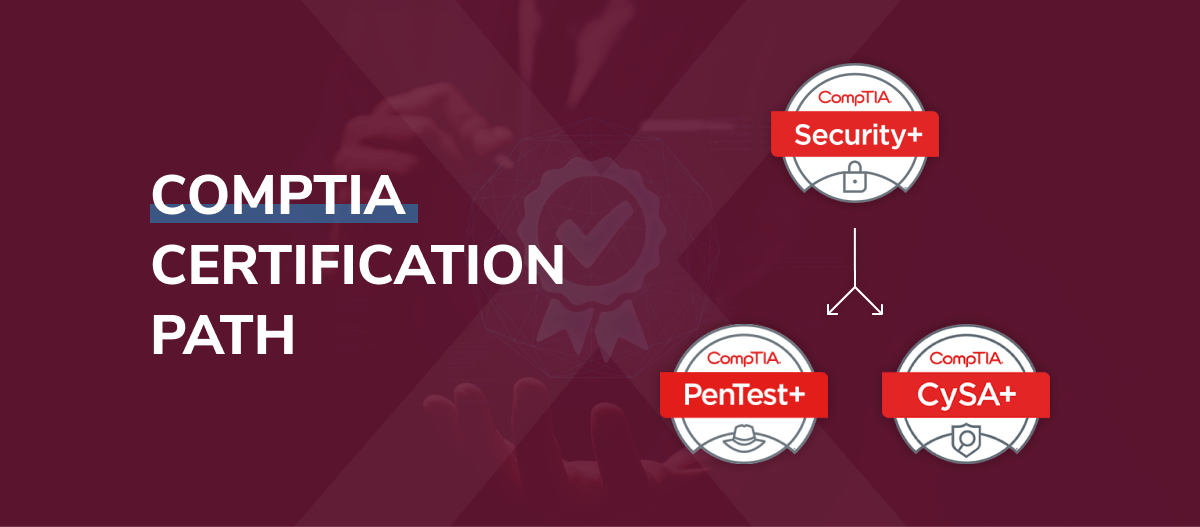
The Security+ exam is part of CompTIA’s certification pathway. This pathway is designed to take you from zero knowledge about IT and computing to being ready for an entry-level position in networking, infrastructure, or cyber security. You can join this pathway at any stage of your journey into cyber security, but having completed a CompTIA certification prior to the Security+, such as A+ or Network+, will better prepare you for Security+ and reduce your study time.
That said, many other certifications will also help you prepare for Security+ and cut down your study time. You can learn about these in The Best IT Certifications for Beginners.
Total Study Time for Security+

These study-hour estimates assume a complete exam-prep approach. In practice, it’s smart to use two video courses because a single one will leave small gaps: pick one as your primary course to work through deeply with solid note-taking, then use a secondary course to skim for missing topics or clearer explanations.
Most Security+ courses run about 20–30 hours each, and our bundle, for example, combines a ~25-hour course with another in the low-30s.
The totals also include the extra time note-taking (about 25-30% on top of video time), hands-on lab practice for performance-based questions (around 40-45% of your prep), 5-8 full practice exams with careful review of mistakes (about 2-3 hours of review per exam), focused memorization of acronyms, ports, protocols, and attack types, and a small buffer for concepts that need a second pass.
To make steady progress, you should aim for at least 10 hours of study per week. If you’re consistently below that, you’ll usually forget content faster than you’re absorbing it, which makes studying feel like starting over each time.
This is even more important because performance-based questions aren’t something you can cram by reading - they require regular hands-on practice each week, so your skills build naturally instead of fading between sessions. See our example below.
Why Network+ First Saves You Time
If you’ve already finished Network+, you’re not starting Security+ from zero. A big part of Security+ assumes you understand networking fundamentals, and Network+ covers those in depth. On top of that, Network+ also includes a meaningful amount of security content that maps directly to Security+ domains. Put together, the overlap is roughly 35-40% of the Security+ exam.
So if you’ve just done Network+, you’ve effectively already mastered between a third and almost half of what Security+ will test, which makes your Security+ prep faster, smoother, and a lot less overwhelming.
Direct Overlap Topics
Here are the specific areas where Network+ carries straight into Security+ and why that overlap saves you hours of study:
- Subnetting and IP addressing: Network+ drills these hard, and Security+ expects you to already be comfortable with them, especially in Domain 3 (Security Architecture) when securing and designing networks.
- Common ports and protocols: Security+ tests ports constantly (HTTP/S, SSH, DNS, RDP, SMB, SMTP, etc.). If you learned them for Network+, you’ve already covered a major memorization load.
- Network security devices: Firewalls, IDS/IPS, proxies, and how they’re positioned in a network show up in both exams, with Security+ building directly on Network+ fundamentals.
- Wireless security: Network+ introduces Wi-Fi standards and security, and Security+ extends that into threats and defenses like WPA2/WPA3, authentication methods, and evil twin attacks.
- Network monitoring tools: Even basic familiarity with Wireshark and tcpdump from Network+ makes Security+ logging, packet analysis, and troubleshooting far easier.
- VPNs and remote access: Core concepts and use cases transfer directly into Security+ secure connectivity objectives.
- Network segmentation and VLANs: Network+ teaches the “how and why,” while Security+ focuses on using segmentation to reduce attack surfaces.
- CIA triad basics: Network+ gives you the early framing of confidentiality, integrity, and availability, which Security+ returns to across multiple domains.
- Intro cryptography concepts: Network+ covers symmetric vs. asymmetric encryption at a high level, so Security+ crypto feels like an extension instead of a brand-new topic.
Time Savings Breakdown
In practical terms, doing Network+ first can shave a lot of time off your Security+ prep.
Since the networking fundamentals are already solid, you can skip or speed through the networking review parts of Security+ courses, typically saving 20-30 hours. Ports and protocols are also already memorized, which removes another big study load and saves 10-15 hours.
On top of that, you keep your study routine and momentum, saving 5-10 hours, and you don’t have to restart from scratch mentally because you’re already in study mode, saving another 5-10 hours.
Bottom line, you can realistically save about 40-65 hours of Security+ prep time by building on the Network+ foundation you already have.
Why Timing Matters
The important caveat is that this momentum advantage assumes you passed Network+ recently: within two weeks is ideal (within 2-6 months is still good). If your Network+ was six or more months ago, it’s smarter to follow a standard path and plan for a networking refresh first.
Even when you roll straight from one cert to the next, it’s worth budgeting about one extra week to recover from exam fatigue before you push into full Security+ prep.
The Momentum Path (6-9 Weeks)
This path is for learners who’ve passed Network+ very recently (ideally within the last two weeks) or who already work in an IT/networking role, so concepts like subnetting, ports, protocols, and network troubleshooting still feel automatic.
You’ll want to commit around 15-20 hours per week, for a total of roughly 90-140 hours, depending on how quickly you can move through overlap topics. It’s the fastest option because Network+ gives you about a 35-40% head start on Security+, meaning you can focus mainly on new security material rather than spending time re-learning networking fundamentals.
Week-by-week roadmap
- Weeks 1–2: Core course sprint + overlap skip (~30–40 hours)
Use one Security+ course as your primary deep dive, skipping networking review sections and focusing only on new security topics; skim a secondary course to catch anything your main one misses. - Week 3: Heaviest domain focus (15–20 hours)
Go all-in on Threats, Vulnerabilities & Mitigations (the biggest slice of the exam), pairing targeted note review with labs that reinforce malware types, attack vectors, and mitigation logic. - Week 4: Operations + labs ramp-up (15–20 hours)
Cover the Security Operations domain while building out your lab routine (log review, authentication setups, access control scenarios) so you’re practicing as you learn. - Week 5: PBQ immersion week (15–20 hours)
Switch into daily hands-on drills for performance-based questions: configure firewall rules, interpret logs, harden wireless settings, and practice troubleshooting scenarios. - Week 6: First exam cycle (15–20 hours)
Take Practice Exams #1–2, then do a full post-mortem on every missed question to identify weak domains and update your revision plan - Week 7: Targeted repair + more exams (15–20 hours)
Take Practice Exams #3–4, and spend the rest of the week patching weak areas with short, focused refresh sessions plus flashcard memorization for ports/protocols/acronyms - Weeks 8–9: Final readiness + scheduling (10–15 hours per week)
Complete Practice Exams #5–6, do a light final review of weakest objectives, taper to avoid burnout, and schedule the real exam when practice scores are consistently solid.
The Standard Path (14-18 Weeks)
This path is for learners with some IT background. For example, you’ve passed A+ but not Network+, you’ve worked in tech before, or you passed Network+ more than six months ago and need a refresh.
You’ll want a steady, sustainable pace of about 12-15 hours per week, adding up to roughly 200-250 hours total. It takes longer because you’ll be learning or re-reviewing networking fundamentals alongside the Security+ material, rather than moving straight into new security content.
Week-by-week roadmap
- Weeks 1-3: Networking refresh + Domain 1 (36-45 hours)
Rebuild core networking fundamentals (subnetting, ports/protocols, OSI/TCP-IP) while starting Domain 1: General Security Concepts, so the security material has something solid to sit on. - Weeks 4-6: Domains 2–3 deep dive (36-45 hours)
Push through your primary Security+ course for Domain 2 (Threats, Vulnerabilities & Mitigations) and Domain 3 (Security Architecture) with detailed notes and regular check-ins on weak areas. - Weeks 7-9: Domains 4–5 + labs begin (36-45 hours)
Finish the video content for Domain 4 (Security Operations) and Domain 5 (Program Management & Oversight), and start light lab work so you’re practicing concepts as they land. - Weeks 10-12: PBQ-heavy lab phase (36-45 hours)
Shift into daily hands-on labs focused on performance-based skills (firewalls, log analysis, access controls, wireless hardening, troubleshooting), since PBQs are a meaningful chunk of the exam and require real configuration ability. - Weeks 13-14: Practice exams 1–3 + full review (24-30 hours)
Take Practice Exams #1–3, then spend serious time reviewing every wrong answer and understanding why the correct choice is right, not just memorizing it. - Weeks 15-16: Practice exams 4–6 + weak-area targeting (24-30 hours)
Run Practice Exams #4–6, drill flashcards for acronyms/ports/protocols, and concentrate study time on your weakest domains before scheduling the real exam.
Important note:
These 14-18 weeks assume you’re studying consistently at about 12-15 hours per week. In real life, disruptions happen, so it’s smart to build in about a two-week buffer to keep your timeline realistic without stressing. And if you’re still scoring below 80% around Week 14, plan to extend your prep by another 3-4 weeks so you can tighten weak areas before exam day.
The Foundation Path (24-28 Weeks)
This path is for career changers with minimal or no IT background who need to build the basics before tackling Security+. Aim for 10-12 hours per week for a total of roughly 280-320 hours. The key requirement here is sequencing: you must build IT and networking foundations first - if you skip phases, Security+ will feel overwhelming and your odds of passing drop sharply.
Week-by-week roadmap
- Phase 1: IT Fundamentals (Weeks 1–6 | 60–72 hours)
Cover CompTIA A+–level IT basics (or an equivalent fundamentals course): operating systems, hardware, troubleshooting, and core IT concepts. This is the base everything else sits on, so focus on understanding, not speed. - Phase 2: Networking Fundamentals (Weeks 7–12 | 60–72 hours)
Work through Network+ material (or a dedicated networking course): subnetting, TCP/IP, routing/switching, and common network protocols. You need to feel solid here because about 30% of Security+ assumes this knowledge. - Phase 3: Security+ Content Build (Weeks 13–20 | 80–96 hours)
Complete two Security+ video courses covering all five domains; take thorough notes throughout since this is new learning, not review. Start labs early in this phase (around Week 15), so concepts lock in through practice. - Phase 4: Mastery & Exam Prep (Weeks 21–28 | 80–96 hours)
Go heavy on hands-on labs in Weeks 21–24, then complete Practice Exams #1–8 with deep review in Weeks 25–27. Use the final stretch for memorization (acronyms, ports, protocols), targeted weak-domain fixes, and schedule your exam once practice scores are consistently 85%+.
Important note:
This 24-28 week timeline assumes you can study steadily without major life disruptions, which isn’t always realistic for career changers. In practice, many people take 6–9 months, and that’s completely normal. Remember, you’re not just cramming for an exam; you’re learning an entirely new field from the ground up. It’s far better to take eight months and pass confidently than to rush in five months and end up failing or burning out.
Red Flags: Signs You Need More Prep Time
Before you lock in an exam date, run through this quick checklist. If you’re ticking several of these boxes, it’s a strong signal to slow down, add review time, and tighten your weak areas first. Here are the warning signs to watch for:
- Below 80% on practice exams after ~75% of your plan
At that point, scores should be trending into the mid-80s. If they’re not, you need more review time before scheduling. - You can’t explain core concepts without notes
If CIA, AAA, and encryption types don’t come out smoothly in your own words, they’re not exam-ready yet. - No hands-on PBQ practice
Performance-based questions require real configuration and troubleshooting skills. Watching videos won’t build that muscle. - Ports and protocols aren’t memorized
Ports are rapid-fire test items, and hesitation costs points. You should recognize the common ones instantly. - Acronyms still feel overwhelming
The exam is acronym-dense, and you can’t stop to decode during a question. If you’re guessing, add study time. - You blur similar concepts
Confusing IDS vs IPS or authentication vs authorization leads to easy misses. You should be able to compare these cleanly. - Life disruptions are breaking your routine
Inconsistent weeks slow retention and force re-learning. It’s better to extend the timeline than fight chaos. - You feel rushed or anxious about the schedule
That usually means the pace is too aggressive for your current load. A calmer runway produces better results. - You’re skipping labs because you “understand the theory”
Theory without practice doesn’t hold under PBQs. If labs are being skipped, your timeline is too tight.
How to Prepare for CompTIA Security+
Your exact study timelines will vary based on your background, practical experience, and learning style, but the goal is the same for everyone: cover all required exam material thoroughly.
Online courses may choose a different order to cover the material. In most cases, trust the way the instructors have organized their content. Studying on your own, especially from multiple written sources, try our suggestions from the last section.
Be Aware of What You Need to Know Prior to Studying
The Security+ certification covers a broad range of material and assumes you already have basic IT and networking knowledge before you begin.
Depending on your background, you may have strong cyber security knowledge and recognize many of the topics covered, or you may be starting from scratch and still building the skills needed to keep up, including areas like access control, threat response, and even core encryption methods.
Before starting your studies, take time to assess where you are now so you can spot gaps early and plan a realistic study duration. This helps you prioritize what to study first, choose the right resources, and tap into online communities for extra clarity or real-world perspectives when you need them.
It also lets you tailor your approach to how you learn best - for example, visual learners often benefit more from video-heavy prep and diagrams. The result is more dedicated study time on what matters most for your path, instead of wasting hours on material you already know or skipping fundamentals you still need.
Study Consistently
When studying for any certification, it is far better to consistently study for an hour or two every day than to have a mammoth study session once a week. Consistent study over an extended period of time benefits you in two ways:
- It creates a study habit that will help you stay motivated throughout your learning journey.
- It ensures repeated exposure to the material you are trying to learn. This sets you up for long-term success and is recognized as the best way to learn and retain new information.
Find High-Value Study Resources
You can pass the Security+ exam using free resources found online, but the hidden cost is time: it can take weeks just to collect, filter, and organize what’s useful before you even begin studying.
That’s why we recommend using a focused set of high-value resources from the start and why our CompTIA Security+ Training Bundle (SY0-007) is built the way it is. It includes 2 full online Security+ courses, 15 practice exams, 14 quizzes, and study flashcards.
The idea is simple: no single course covers every objective perfectly, so you use one as your primary deep-dive (with proper note-taking) and the second to skim for gaps and fresh explanations.
Even if you don’t use our bundle, the same recipe applies: aim for two thorough courses (most run 20-30 hours of video each), add full practice exams to prove readiness and build stamina, and use flashcards for acronyms, ports, protocols, and attack types.
Pre-made flashcards save time because they’re designed by people who already know what’s most testable, while making your own can reinforce retention as you go.A great place to pull all of this together is the StationX Master’s Program. Beyond giving you access to the full course library and practice tests, it supports your progress with mentors, mastermind groups, study partners, and a clear study roadmap, so you stay consistent, get feedback when you’re stuck, and move toward your cyber security career faster.
Take Practice Tests
You should regularly take practice tests before you sit the Security+ exam.
Practice tests help you measure how much of the material you really know, clarify how many hours of revision you still need, and, most importantly, identify weak areas early enough to fix them. Alongside your online courses, schedule regular review sessions where you revisit missed questions. It also helps to use online forums to compare notes with other candidates, pick up valuable insights into tricky objectives, and sanity-check whether your study plan aligns with what the exam covers in practice.
To give yourself the best chance of passing, aim to consistently score 85% or higher on your practice tests, and use each result to guide exactly how many hours you should spend reinforcing your weakest domains before exam day.
Conclusion
Keep in mind that everyone’s pace is different, so your timeline may be shorter or longer.
What matters most is following a structured study plan, working directly from the official exam objectives, and reinforcing your knowledge with plenty of practice questions and at least a few practice tests so you can spot weak areas early.
Combine that with hands-on work to lock in practical skills, especially for performance-based questions, and you’ll be in the best position to pass.
Using high-value study resources, such as the StationX Master's Program, can significantly decrease the time it takes to get your Security+ certification.
Click the banner below to see our CompTIA Security+ Training Bundle. For a one-time purchase, get lifetime access to multiple Security+ exam prep courses, practice tests, flashcards, and more.
The CompTIA Security+ Course & SY0-701 Practice Test Bundle includes:
- CompTIA Security+ Study Guide: SY0-701 Total Course
- CompTIA Security+ Training: Self-Paced Course
- CompTIA Security+ SY0-701 Exam Questions and Answers
- CompTIA Security+ Practice Test Series: Ace the SY0-701
- CompTIA Security+ Exam Objectives Flash Cards: SY0-701 Prep
Frequently Asked Questions

Guarantee Your Cyber Security Career with the StationX Master’s Program!
Get real work experience and a job guarantee in the StationX Master’s Program. Dive into tailored training, mentorship, and community support that accelerates your career.
- Job Guarantee & Real Work Experience: Launch your cybersecurity career with guaranteed placement and hands-on experience within our Master’s Program.
- 30,000+ Courses and Labs: Hands-on, comprehensive training covering all the skills you need to excel in any role in the field.
- Pass Certification Exams: Resources and exam simulations that help you succeed with confidence.
- Mentorship and Career Coaching: Personalized advice, resume help, and interview coaching to boost your career.
- Community Access: Engage with a thriving community of peers and professionals for ongoing support.
- Advanced Training for Real-World Skills: Courses and simulations designed for real job scenarios.
- Exclusive Events and Networking: Join events and exclusive networking opportunities to expand your connections.
TAKE THE NEXT STEP IN YOUR CAREER TODAY!