In order to understand what is Kali Purple, it’s important to recognize it as a defensive-oriented cyber security distribution designed to help organizations build, test, and improve their security operations.
Built on the NIST Cybersecurity Framework, Kali Purple combines a wide range of tools for monitoring, detection, incident response, and network defense, all within a structured, standards-aligned environment designed to strengthen the overall security posture.
In this article, we will delve into the unique features and capabilities of Kali Purple, explore its differences from traditional Kali Linux, and examine how it aligns with the NIST Cybersecurity Framework. We will also take a closer look at some of the new tools in Kali Purple, discuss the SOC-in-a-box architecture, and provide guidance on obtaining and installing the distribution.
Join us as we take a first look at Kali Purple and explore the ins and outs of this impressive platform.
What Is Kali Purple?
Kali Purple is a novel addition to the Kali Linux ecosystem, designed for cyber security professionals and ethical hackers focused on defensive security strategies. As an extension of the renowned Kali Linux platform, Kali Purple seems uniquely positioned to address the needs of its target audience by leveraging the NIST Cybersecurity Framework.
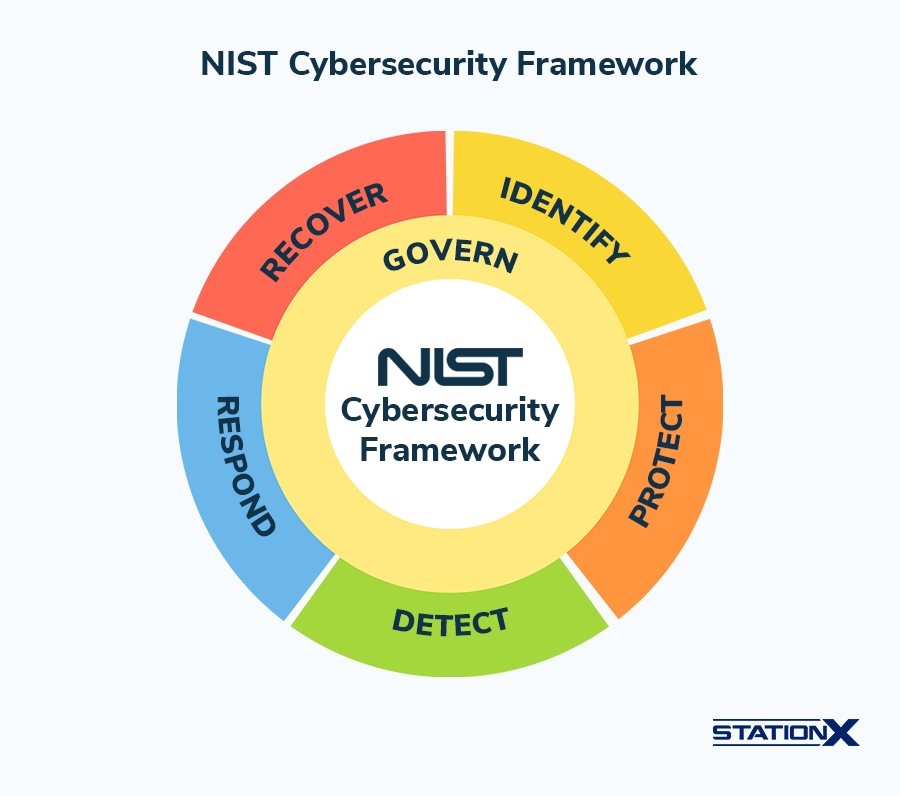
The NIST Cybersecurity Framework (CSF) 2.0 provides a high-level, strategic structure for managing cyber security risk. While earlier versions centered on five core functions, CSF 2.0 expands the model to six functions, adding Govern to reflect the growing importance of organizational oversight and risk strategy:
- GOVERN (GV) - Establishes and oversees the organization’s cyber security risk strategy, policies, and roles, ensuring security is integrated into enterprise risk management and aligned with business goals.
- IDENTIFY (ID) - Determines assets, suppliers, and cyber security risks to prioritize protection efforts and highlight improvement opportunities across security processes.
- PROTECT (PR) - Implements safeguards such as access control, training, data security, and platform resilience to reduce the likelihood and impact of cyber events.
- DETECT (DE) - Enables timely discovery and analysis of anomalies, threats, and indicators of compromise to support effective response actions.
- RESPOND (RS) - Focuses on containing and managing cyber security incidents through analysis, mitigation, reporting, and coordinated communication.
- RECOVER (RC) - Restores systems and operations after incidents while supporting resilience and clear communication during recovery efforts.
Unlike traditional Kali Linux, which you may know for its use in offensive security, Kali Purple expands the platform's capabilities by integrating an array of defensive tools and resources designed to equip you with the ability to proactively identify, respond to, and mitigate cyber security threats. This strategic approach should allow Kali Purple to function as a complementary solution within the Kali Linux family rather than replacing the existing platform.
Despite being in its early stages of development, Kali Purple has already garnered interest from the cyber security community, with anticipation building around future updates and enhancements that could further refine and expand its feature set and demonstrate clearer use cases. As the platform continues to evolve, Kali Purple could prove to become a valuable resource to help you strengthen your defensive posture.
How Is Kali Purple Different?
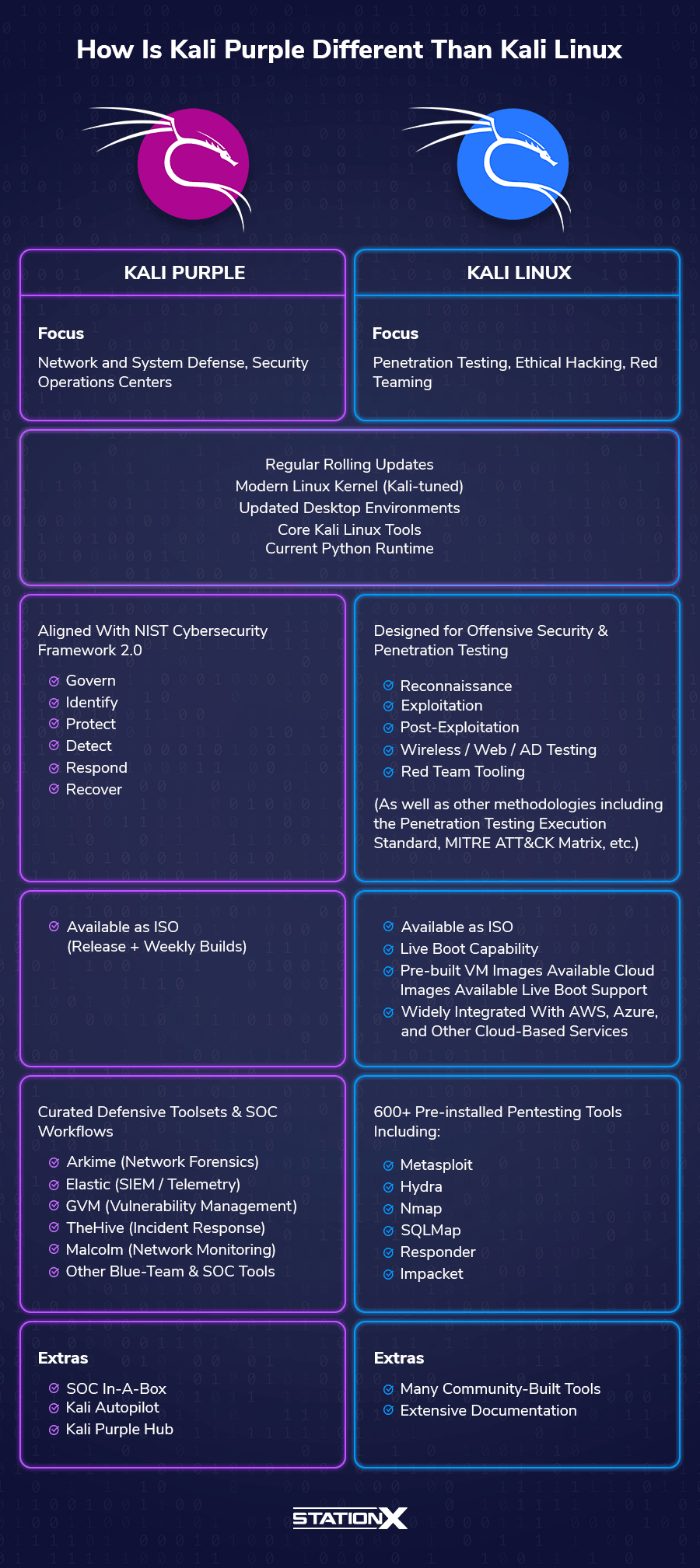
Kali Purple distinguishes itself from its Kali Linux counterpart by offering a distinct and innovative set of tools and layouts tailored to meet your specific demands as a defensive cyber security practitioner. This divergence is evident not only in the tools and resources provided but also in the platform's overall architecture and design philosophy.
One of the most striking differences between Kali Purple and traditional Kali Linux is the inclusion of new tool categories specifically curated to bolster defensive security capabilities. These tools, which will be explored in greater detail in subsequent sections, represent a significant departure from the predominantly offensive-oriented toolset found in standard Kali Linux distributions.
Kali Purple is built on the same Debian-derived foundation as Kali Linux, running a modern Linux kernel configured for security testing and compatibility with a wide range of hardware. It also incorporates updated desktop environments, providing a more refined and user-friendly experience while supporting the needs of security professionals.
Desktop Environments included with Kali 2025.4:
- Xfce 4.20.5 - The lightweight, performance-oriented default desktop environment in Kali, providing a stable and efficient interface that works well alongside resource-intensive security tools.
- KDE Plasma 6.5 - A feature-rich, highly customizable desktop environment with enhanced window management, fuzzy app search, and new utility improvements, ideal for users who prefer a fully featured GUI.
- GNOME 49 - The latest GNOME release with Wayland as its default display server and refined usability features, including updated app organization and interface polish.
Another key differentiator is the introduction of the SOC-in-a-box architecture. This innovative design integrates a diverse suite of security operations center (SOC) components into a modular, connected platform, streamlining workflows and facilitating improved collaboration between security professionals.
The intent behind using Kali Purple as a SOC In-A-Box is to set up multiple machines that monitor a network in various ways. Additionally, you could use them to connect as a red team/blue team exercise. One thing that seems to point to this is the way the tools are broken out during the installation process. More on that later.
Kali Purple also features Kali Autopilot, a powerful attack script-building tool that automates various tasks and processes, further enhancing the platform's versatility and adaptability.
Kali Purple Hub
Also introduced is Kali Purple Hub, designed to allow the community to upload practice pcap files and their own custom Kali Autopilot scripts.
Kali Purple benefits from Kali Linux’s up-to-date Python environment, ensuring compatibility with modern Python-based security tools and libraries. As of early 2026, the latest stable Python release is Python 3.14.2, which includes performance improvements, enhanced error reporting, and expanded standard library features, all of which support a richer tooling ecosystem.
Python 3.14.2
- Enhanced error reporting with more precise traceback information, making debugging faster and more intuitive.
- Performance improvements across the interpreter, contributing to noticeable speed gains in many workloads.
- Expanded standard library capabilities, including continued support for modules like tomllib for working with TOML configuration files.
- Interpreter optimizations that improve execution efficiency and stability.
- Ongoing typing system enhancements, supporting clearer, more maintainable, and large-scale Python codebases.
You can read more on the Python Release Notes.
Current Python Package Management in Kali
Python package handling in Kali has evolved to improve system stability and avoid breaking OS-managed dependencies:
- APT remains the preferred method for installing Python packages that are part of Kali’s repositories:
sudo apt install python3-<package> - pipx is now the recommended method for installing standalone Python applications in isolated environments. This approach minimizes conflicts with system packages and improves overall system reliability.
- Virtual environments (venv) are recommended for development work or project-specific dependencies.
Direct use of pip to install packages system-wide is discouraged, since it can overwrite distribution-managed libraries and cause instability. Using pipx or virtual environments helps maintain a clear separation between system packages and user-installed tools.
By combining a modern Python ecosystem with structured package management practices, Kali Purple supports both offensive and defensive security tooling while maintaining system reliability and compatibility.
CompTIA Voucher Hub
Planning your next CompTIA exam? Save up to 30% with our CompTIA Voucher Hub — official partner discounts for all CompTIA certifications, including Security+, Network+, A+, and more.
What Defensive Tooling Comes With Kali Purple?
When exploring what is Kali Purple, one of the clearest answers lies in the defensive toolsets it curates and organizes, rather than brand-new tools created specifically for the platform.
Kali Purple does not introduce entirely new security software. Instead, it packages and structures existing, well-known defensive security tools into a workflow aligned with the six functions of the NIST Cybersecurity Framework (CSF) 2.0: Govern, Identify, Protect, Detect, Respond, and Recover.
What changes with Kali Purple are the menu structure, meta-packages, documentation, and SOC-style workflow orientation - essentially positioning Kali as a “defensive security lab” rather than a traditional offensive toolkit.
As a note: The tools we list below are included because they are part of the Kali Purple defensive toolset/catalog (i.e., they’re available through Kali’s repositories and Kali Purple meta-packages or documented install paths), even if they are not preinstalled on a fresh Kali Purple installation. This section is meant to show what Kali Purple supports and organizes—not only what appears by default after install.
Govern
The Govern function focuses on cyber security strategy, risk oversight, policies, and roles. While Kali Purple is primarily tool-focused, governance elements can be indirectly supported through visibility, logging, and reporting capabilities in SIEMs and monitoring tools like Elastic Security.
However, Kali Purple does not yet provide dedicated governance, policy management, or enterprise risk management tooling, meaning this function is only partially represented and relies more on how organizations use the platform rather than built-in features.
Identify
In this domain, tools such as GVM (Greenbone Vulnerability Management) are crucial in assessing and identifying potential vulnerabilities within an organization's infrastructure. By continuously scanning systems and networks, GVM enables security teams to stay ahead of potential threats and maintain a strong security posture.
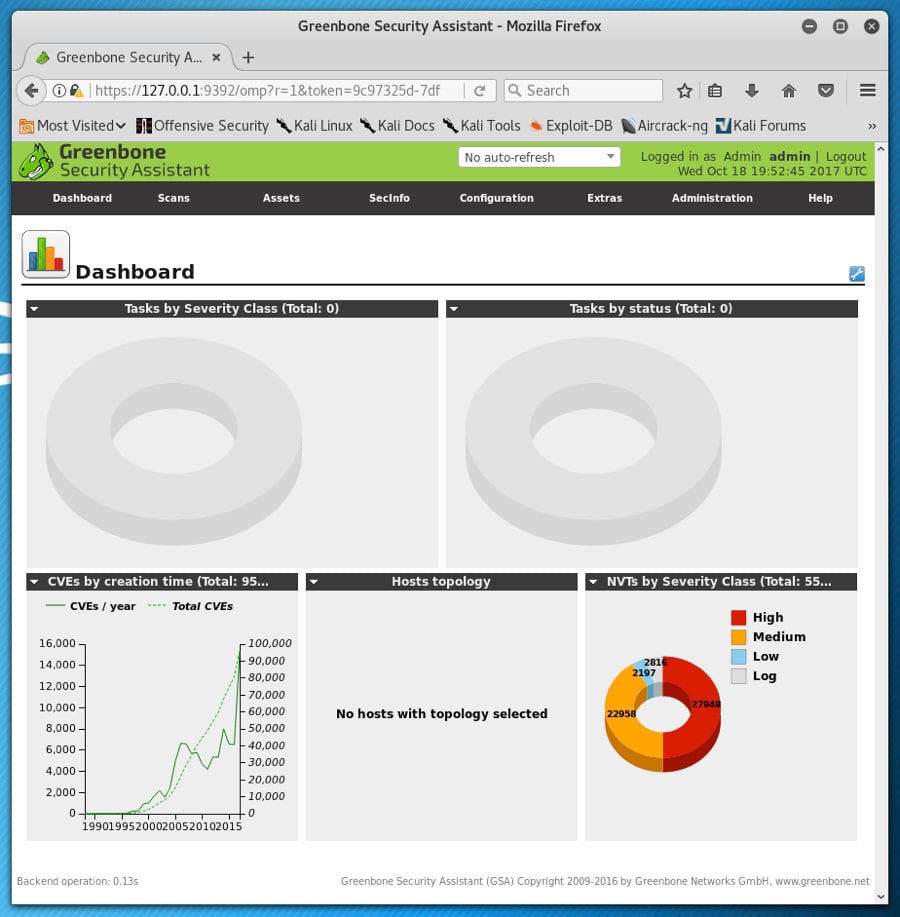
Needs to be installed
- Installation instructions: https://gitlab.com/kalilinux/kali-purple/documentation/-/wikis/101_30:-GVM
Protect
Kali Purple includes a variety of tools aimed at bolstering an organization's protective measures. For example, Elastic Security, a powerful Security Information and Event Management (SIEM) solution, consolidates and analyzes security data from various sources, facilitating rapid detection and mitigation of potential threats. However, it's worth noting that some users have reported issues with setting up Elastic Security in Kali Purple.
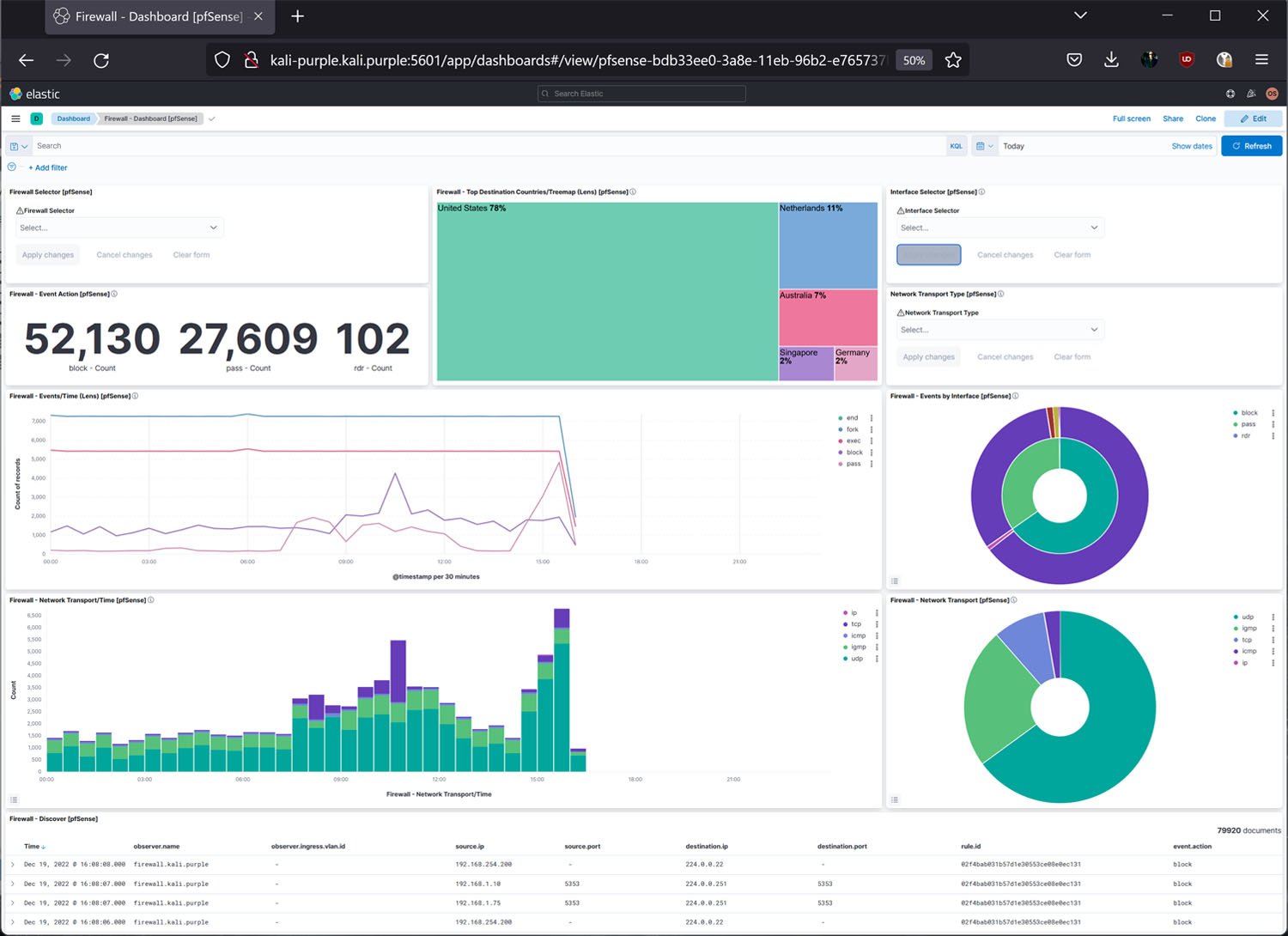
Needs to be installed
- Installation instructions: https://gitlab.com/kalilinux/kali-purple/documentation/-/wikis/101_40:-Elastic-Agent
As noted above, there are known issues with installing all the dependencies.
Detect
The Detect domain focuses on monitoring and analyzing network activity to identify potential security incidents. Tools such as Arkime, a network forensics platform, excel in this area, providing detailed insights into network traffic and enabling the early detection of malicious activity. Malcolm, another network monitoring and analysis tool, complements Arkime, though it is known to have setup issues in Kali Purple.

Needs to be installed
- Installation instructions: https://github.com/arkime/arkime
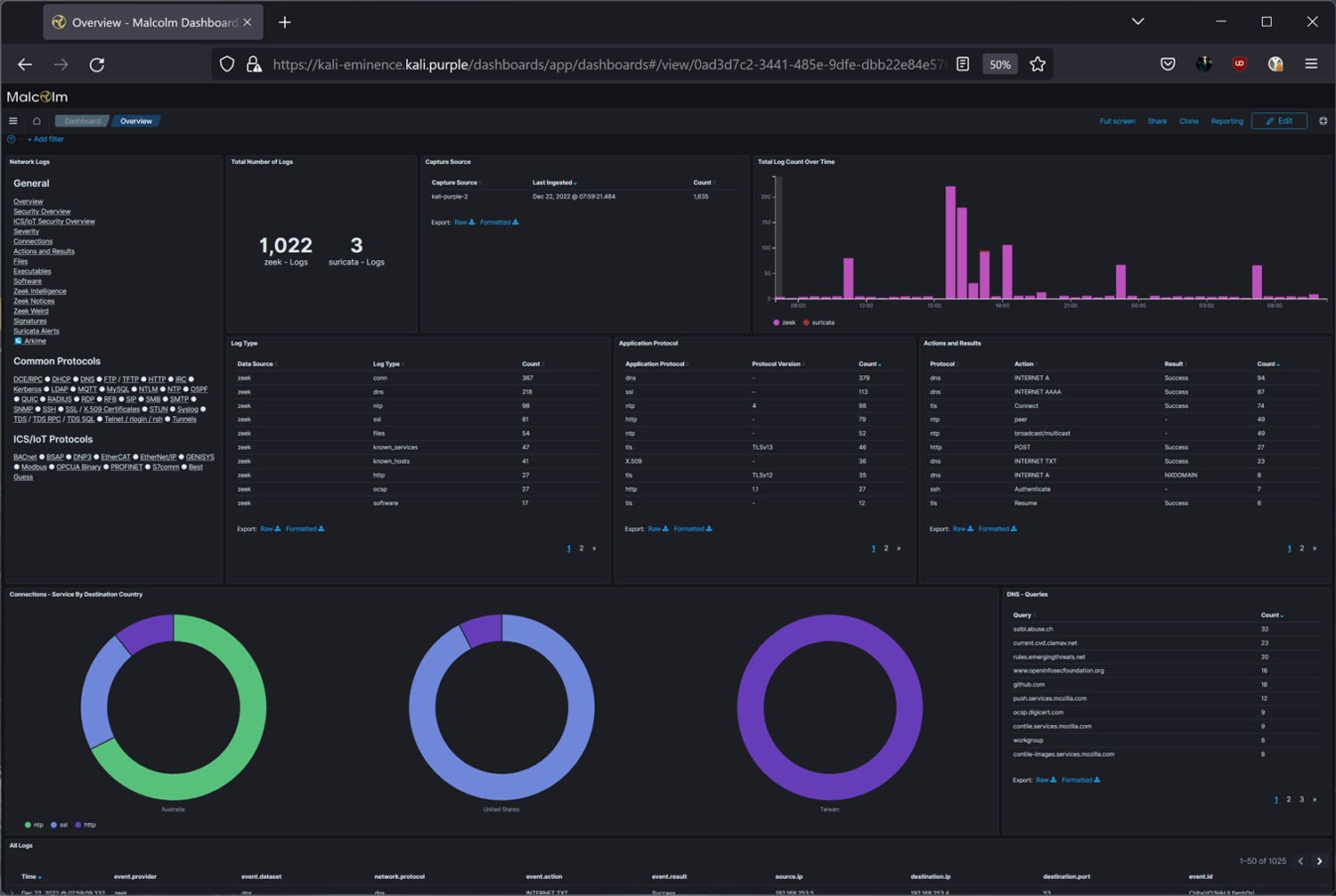
Needs to be installed
- Installation instructions: https://gitlab.com/kalilinux/kali-purple/documentation/-/wikis/401_20:-Malcolm-Installation
As noted above, there are known issues with installing all the dependencies.
Respond
In the event of a security incident, an efficient response is crucial. Kali Purple offers TheHive, an incident response and forensic tool, to help security teams manage and coordinate their response efforts. TheHive provides a collaborative environment where team members can share information, track progress, and streamline incident response.
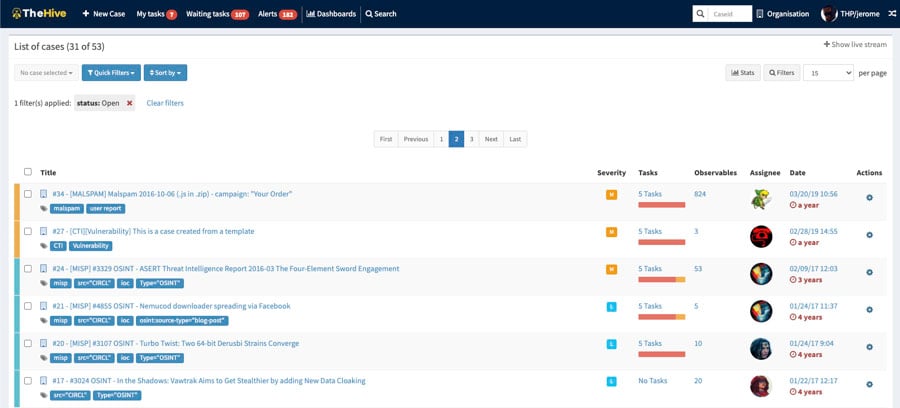
Needs to be installed
- Installation instructions: https://github.com/TheHive-Project/TheHive
Remote Cyber Security Jobs Database
Looking to work from anywhere? Tap into our Remote Cyber Security Jobs Database — over 360 remote-friendly companies, 70+ cyber employers hiring remotely, and 50+ niche job boards all organised into one curated resource.
Recover
Recover focuses on restoring systems and operations after incidents. Kali Purple does not introduce dedicated recovery or business continuity tools. However, incident response and forensic tools like TheHive can support post-incident analysis and lessons learned, which, in turn, contribute indirectly to recovery planning and resilience improvement.
Kali Purple’s toolset aims to support the full lifecycle of defensive security operations under NIST CSF 2.0. While its strengths lie in detection, response, and monitoring, governance and recovery capabilities depend more on how organizations implement processes around the tools rather than on native platform features.
What Kali Purple Actually Changes
Kali Purple’s innovation is not in inventing new tools, but in:
- Reorganizing tooling around defensive security workflows
- Providing meta-packages for SOC-style environments
- Aligning menus with NIST CSF functions
- Supplying documentation and structure for defensive operations
- Framing Kali as usable for blue teams, not just red teams
If you want to learn about other defensive toolsets that come with Kali Purple as part of the core Kali Linux suite, take a look at our article on the 25 Top Penetration Testing Tools for Kali Linux.
What is SOC In-A-Box
In today's rapidly evolving cyber security landscape, the need for a holistic, integrated approach to security operations has never been more crucial. SOC In-A-Box, a key feature of Kali Purple, addresses this need by offering a streamlined, centralized solution for managing security operations and incident response.
SOC In-A-Box, or Security Operations Center In-A-Box, is an innovative architecture that aims to consolidate essential defensive cyber security tools and processes into a single, cohesive platform. This integrated approach allows you to efficiently monitor, analyze, and respond to threats, vulnerabilities, and incidents in real time.
By bringing disparate tools and capabilities together, SOC In-A-Box provides a unified view of your security posture, enabling you to make informed decisions and take swift, decisive action in response to emerging threats.
Kali Purple's SOC In-A-Box offers you several advantages. It will simplify deployment and configuration, making it easier for you to get up and running with minimal effort. Additionally, the platform's modular design enables seamless integration of tools and technologies, allowing you to tailor your security operations center to your unique requirements. More on this in the next section.
Furthermore, SOC In-A-Box can foster collaboration and information sharing among your team members, promoting a more effective and efficient approach to incident response and threat mitigation. It could also help you reduce reliance on multiple, disparate solutions, streamlining your security infrastructure and reducing the complexity of managing a comprehensive cyber security program.
Although a final decision on this may need to wait until Kali Purple's future development.
How Do I Get Kali Purple?
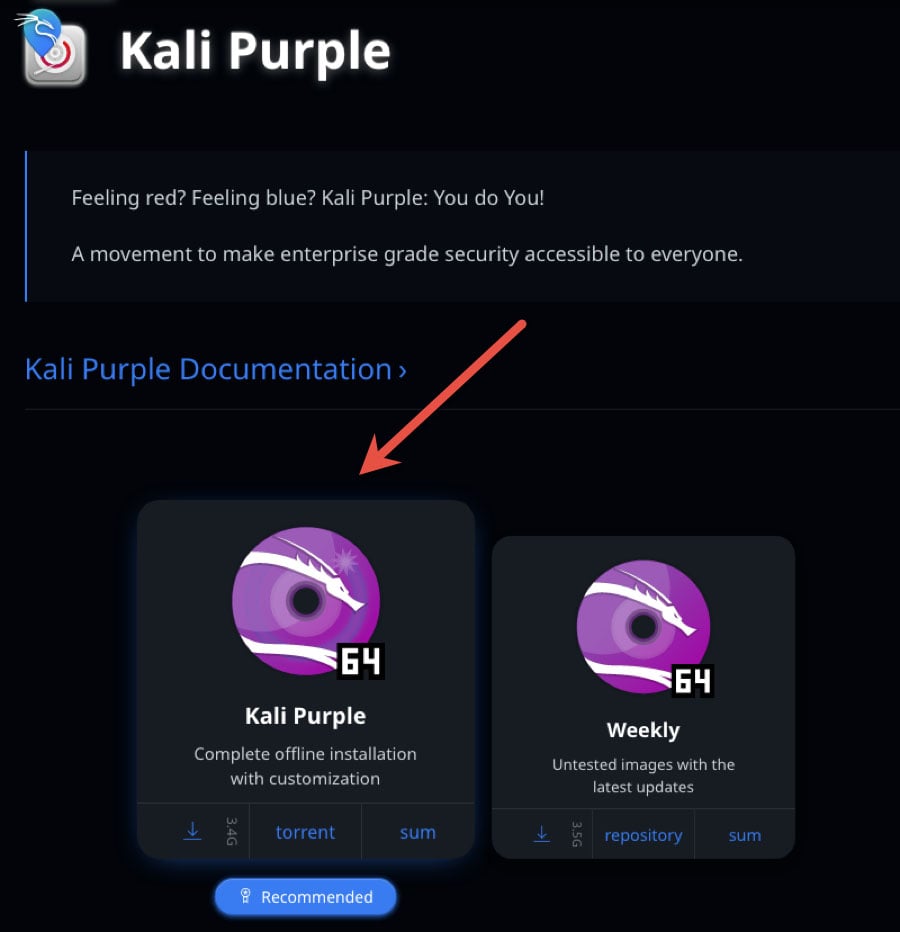
Getting your hands on Kali Purple is pretty much the same as getting any other Kali distro. Head over to their website and go to the downloads section.
One thing you’ll notice right away is that Kali Purple’s download options differ from those in standard Kali releases. Instead of a broad range of pre-built VM or ARM images specifically labeled for Purple, Kali primarily provides Kali Purple ISO images. These include a complete offline installation ISO and weekly images, which receive more frequent updates but may be less thoroughly tested.
This reinforces the idea that Kali Purple is designed to be configured after installation, allowing users to select and install only the defensive toolsets they need rather than starting with a heavily prepackaged environment.
Let’s move quickly through installation as an example. The process largely mirrors a standard Kali or Linux install. A key difference appears at the stage where the desktop environment and tool categories are selected.
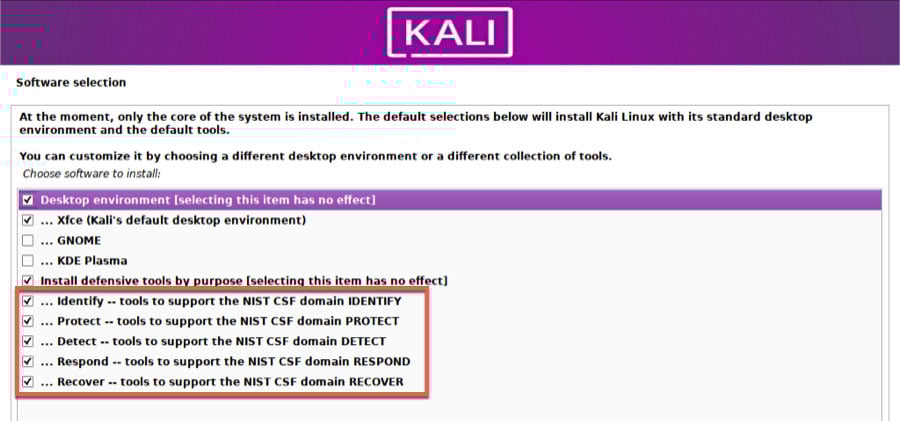
Here, you’ll see groupings aligned with the NIST Cybersecurity Framework functions, reflecting Kali Purple’s defensive focus. Rather than delivering a fixed toolset, Kali Purple emphasizes modularity: users can mix and match categories based on whether the system is intended for monitoring, detection, response, or analysis.
Kali Purple includes tools for network monitoring, threat intelligence, incident response, and forensics, which means configurations can vary significantly across deployments. While Kali offers many VM images for Kali Linux in general, Purple-specific VM images are not clearly presented as a standard offering, further suggesting that the ISO-based, customizable approach is central to how Kali expects users to deploy Purple.
However, you can create specific builds that work for your unique use cases and create a snapshot inventory for a ready setup later. We cover all the steps you need to take in a straightforward manner in our article How to Install Kali Linux on VirtualBox & Start Hacking Now.
What Is Kali Purple: Conclusion
Kali Purple represents a significant leap forward for defensive cyber security, offering a powerful and versatile suite of tools that caters to each of the five domains of the NIST Cybersecurity Framework. By addressing the diverse needs of security professionals, Kali Purple equips you with the means to effectively identify potential threats, implement robust protection measures, detect malicious activity, respond swiftly to security incidents, and recover from cyber attacks.
Kali Purple's holistic approach to cyber security, in combination with its continued commitment to incorporating cutting-edge tools and features, makes it an indispensable asset for security professionals and organizations seeking to bolster their security posture.
As the landscape of cyber security threats continues to evolve, Kali Purple's focus on defensive measures and alignment with the NIST CSF 2.0 should keep it at the forefront of the industry, providing you with the tools and resources to navigate the increasingly complex world of cyber threats.
Remember to check out our StationX Master's Program. Inside, you’ll get access to 30,000+ training courses with comprehensive coverage across topics and levels, 40+ career paths with a personalized study roadmap based on your goals and situation, and 1:1 expert support with direct access to specialists and fast response times.
You can also see our Information Security Training Bundles, granting lifetime access to top courses for a one-time purchase. Learn ethical hacking, cyber security, and prepare for top certifications.
We have bundles on:
- Pentesting, red teaming, and web app hacking
- Certification prep, including CompTIA, ISC2, AWS, Cisco, and Azure
- DevSecOps and Coding
- Linux
- AI
- And much more!

Guarantee Your Cyber Security Career with the StationX Master’s Program!
Get real work experience and a job guarantee in the StationX Master’s Program. Dive into tailored training, mentorship, and community support that accelerates your career.
- Job Guarantee & Real Work Experience: Launch your cybersecurity career with guaranteed placement and hands-on experience within our Master’s Program.
- 30,000+ Courses and Labs: Hands-on, comprehensive training covering all the skills you need to excel in any role in the field.
- Pass Certification Exams: Resources and exam simulations that help you succeed with confidence.
- Mentorship and Career Coaching: Personalized advice, resume help, and interview coaching to boost your career.
- Community Access: Engage with a thriving community of peers and professionals for ongoing support.
- Advanced Training for Real-World Skills: Courses and simulations designed for real job scenarios.
- Exclusive Events and Networking: Join events and exclusive networking opportunities to expand your connections.
TAKE THE NEXT STEP IN YOUR CAREER TODAY!